Skip to content
SMARTree Software Logo SMARTree Software Logo
  • Home
  • Overview
    • Motivation
    • What are SMARTrees?
    • GIT Integration
    • SMART Tags
    • Embedded Logic
    • Mathematical Operations
    • XML Format
    • Active verses Passive Trees
    • Contact
  • Build
    • Team
    • Facilities
    • Materials
    • Models
    • Process
    • Testing
    • Report
  • View
    • The Client GUI
    • GIT Management
    • SMARTree Reader
    • YouTube Channel
  • Support
    • Installation
      • Requesting a License
    • The Client GUI
      • SMARTree Editor
      • SMART Select
      • SMART Search
      • Preview Window
      • Mathematical Operations
      • Saving SMARTrees
    • GUI Ribbons
      • Library Ribbon
      • SMARTree Ribbon
      • SMARTag Ribbon
      • Files Ribbon
      • Search Ribbon
      • Model Ribbon
      • Tools Ribbon
      • View Ribbon
    • Elements
      • Header
      • Text
      • Value
      • Date
      • Selection
      • Table
      • Tag
      • Plot
      • Link
      • Laminate
      • Logical Elements
    • Model Library
      • Micromechanics
      • 2D Laminate Mechanics
      • Composite Cylinder Design
    • Modules
      • Material Explorer
      • Image Analysis
      • Digital Image Correlation
      • QR Generator
    • Mathematical Operations
    • Reporting and External Editors
    • SMARTree Reader
  • Register
    • Log In
    • Edit Profile
  • Home
  • Overview
    • Motivation
    • What are SMARTrees?
    • GIT Integration
    • SMART Tags
    • Embedded Logic
    • Mathematical Operations
    • XML Format
    • Active verses Passive Trees
    • Contact
  • Build
    • Team
    • Facilities
    • Materials
    • Models
    • Process
    • Testing
    • Report
  • View
    • The Client GUI
    • GIT Management
    • SMARTree Reader
    • YouTube Channel
  • Support
    • Installation
      • Requesting a License
    • The Client GUI
      • SMARTree Editor
      • SMART Select
      • SMART Search
      • Preview Window
      • Mathematical Operations
      • Saving SMARTrees
    • GUI Ribbons
      • Library Ribbon
      • SMARTree Ribbon
      • SMARTag Ribbon
      • Files Ribbon
      • Search Ribbon
      • Model Ribbon
      • Tools Ribbon
      • View Ribbon
    • Elements
      • Header
      • Text
      • Value
      • Date
      • Selection
      • Table
      • Tag
      • Plot
      • Link
      • Laminate
      • Logical Elements
    • Model Library
      • Micromechanics
      • 2D Laminate Mechanics
      • Composite Cylinder Design
    • Modules
      • Material Explorer
      • Image Analysis
      • Digital Image Correlation
      • QR Generator
    • Mathematical Operations
    • Reporting and External Editors
    • SMARTree Reader
  • Register
    • Log In
    • Edit Profile

Support

  1. Location::
  2. Home
  3. Support
Supportmactierney2018-12-29T14:11:03-05:00

The Support of SMARTree is done extensively through step by step videos shown below. 

Feel free to browse these tutorials so that you can take advantage of the powerful SMARTree client with GIT integration. 

SMARTree Software – Tutorial 1 – Getting Started

SMARTree Software – Tutorial 2 – Licensing

SMARTree Software – Tutorial 3 – Creating SMARTrees

SMARTree Software – Tutorial 4 – SSH key connection

SMARTree Software – Tutorial 5 – Using GIT Features

SMARTree Software – Tutorial 6 – The SMART Tag Concept

SMARTree Software – Tutorial 7 – Running a Model – Micromechanics

SMARTree Software – Tutorial 8 – Image Analysis

SMARTree Software – Tutorial 9 – SMARTree XML and Reports

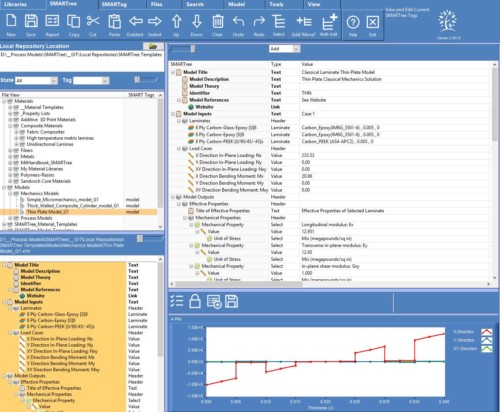
SMARTree Software – Tutorial 10 – Running a Model – Composite Plate Mechanics

SMARTree Software – Tutorial 11 – Autocoding Models for External Solutions

SMARTree Software – Tutorial 12 –  Composite Cylinder Design

SMARTree Software – Tutorial 13 – Digital Image Correlation
SMARTree Software – Tutorial 14 – Advanced Search

SMARTree Software – Tutorial 15 – QR Codes

Tip: Make SMARTree Models

Did you know you can turn a SMARTree into an active Model. Simply add a “model” SMART Tag, contact us and we’ll add an executable dynamic link library to to the client to actively solve tree data. See models in action. 

Tip: Image Analysis

SMARTree Pro includes an Image analysis module! See it in action here!

SMART Select

New in V2.5 SMART Select allows users to quickly access any SMARTree data. See it in action here. 

Copyright -  SMARTree Software | All Rights Reserved | Powered by WordPress
FacebookYouTube
Toggle Sliding Bar Area

Categories

Page load link
Go to Top